

Privacy Policy
Table of Contents
Cloudflare (CDN)
We collect public IP and browser info from users only for the following purposes:
- Getting aggregated generic geographic information (user’s country).
- Protecting web resources from attacks.
LocalStorage
LocalStorage is only used to save dark/light theme setting.
How to improve privacy when using this website (and others)
This website doesn’t show ads, doesn’t use analytics and doesn’t set cookies of its own. However, most websites do use cookies and can get personal data like IPs to build user profiles, in order to show personalized ads or to calculate unique page views. You should be free to choose if you want to be tracked, so I will show you some methods to improve your privacy when browsing this website and others:
Change browser settings
Firefox:
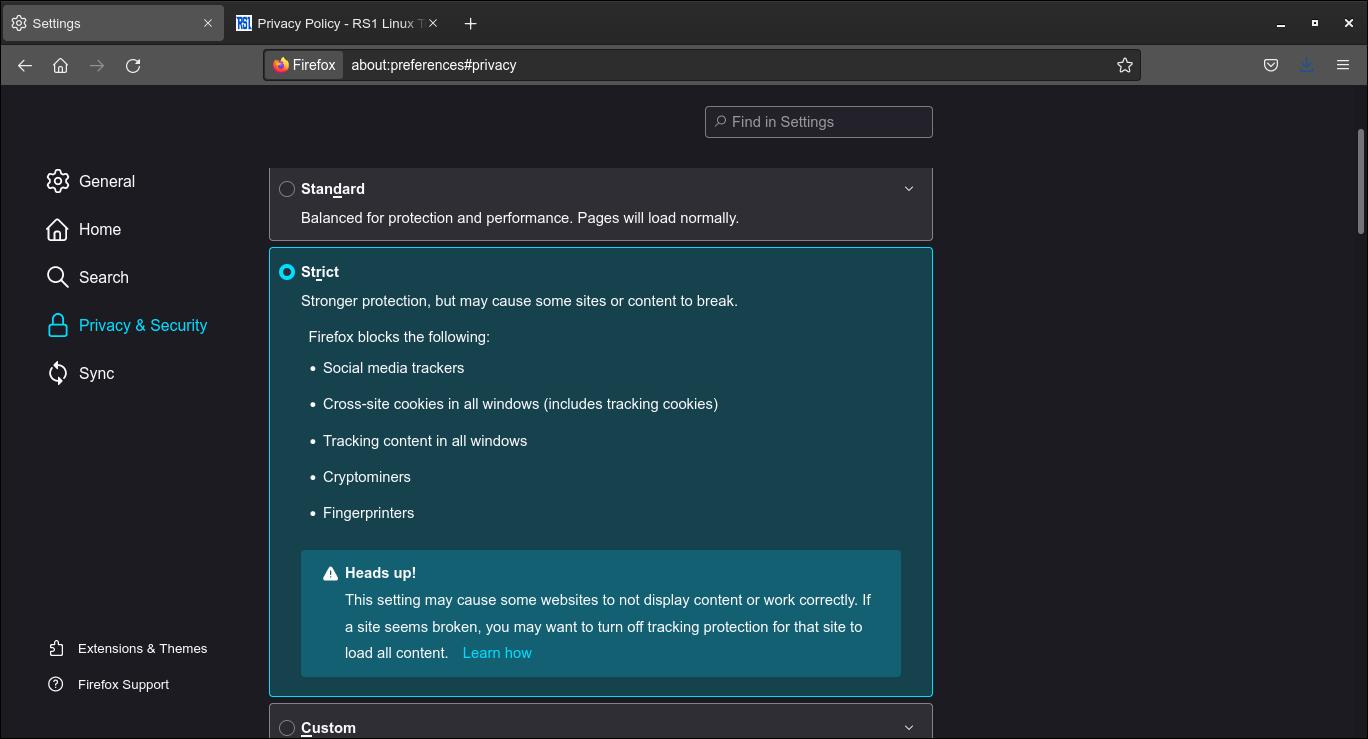
- Go to Settings > Privacy & Security.
- Under “Enhanced Tracking Protection”, select “Strict”. This will block any third-party cookies and any tracking content.
“Private” browsers
Some web browsers can deny all cookies (and even disable Javascript) by default, and you can create exceptions for specific domains. In Android, a good private browser is Privacy Browser. In Linux, check LibreWolf, a privacy-focused fork of Firefox.
Tor
Using Tor can improve your privacy because your IP is not accessible for websites. You must use Tor with a compatible browser (like Tor Browser).
If you have any suggestion, feel free to contact me via social media or email.
Latest tutorials and articles:




Featured content: